Your First Model in 10 Minutes

A walkthrough for building your first machine learning model on Tinker.

Your First Model in 10 Minutes

A walkthrough for building, backtesting, and (optionally) publishing your first model on Sharksnip Tinker.

No prior ML experience required. If you can read a spreadsheet, you can do this.

TL;DR for the degens

  • 10 minutes, free, in your browser. No Python install, no GPU, no rented compute.
  • You'll train an NFL spread cover model on 5 years of real games.
  • At the end you can either keep it private or publish it to the marketplace and start earning.
  • If your first try sucks, that's normal. Hit Optimize Weights (Sharp call) and let the platform tune it for you.
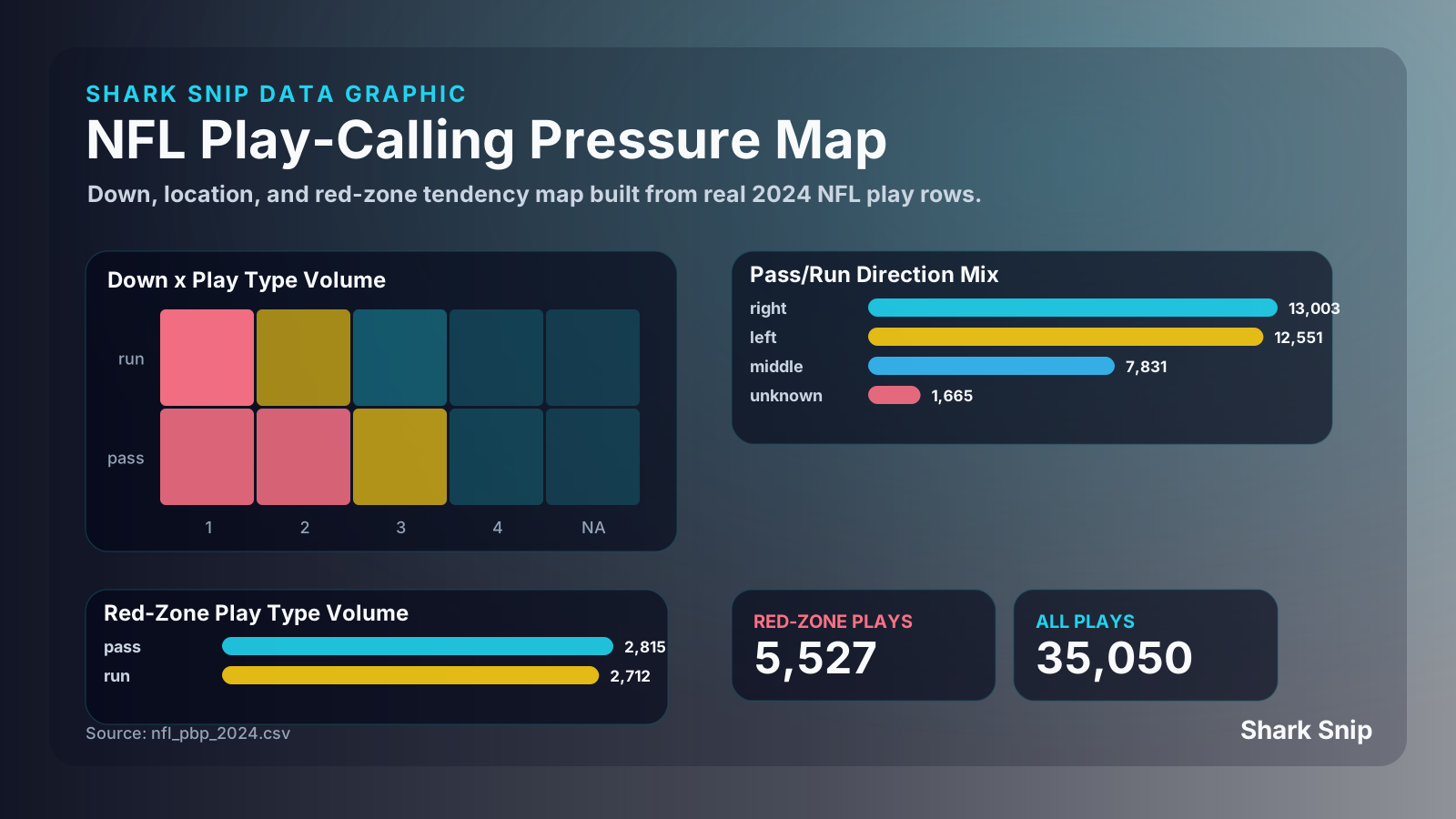
NFL play-calling pressure map — down × play-type matrix, red-zone tendencies, run/pass directional mix

This is the data shape Tinker hands your model: every play, every down, every team, every red-zone snap. You don't fetch it; you check the boxes.


What we're going to build

A simple NFL spread prediction model. It will:

  • Take recent team performance, line movement, and rest days as inputs
  • Output a probability that the favorite covers the spread
  • Be backtested against 5 years of historical games
  • Be ready to publish to the marketplace (if you want)

This isn't going to be a world-beating model. It's going to be a working starter — and the starting point for forking, modifying, and improving.


Step 1: Get into Tinker

  1. Sign up at sharksnip.com (free account works)
  2. Click Tinker in the top nav
  3. Click New Model

You'll see three starter templates:

  • Spread Predictor — game-level outcome model (this is what we're using)
  • Total Predictor — over/under model
  • Player Prop Model — individual player projections

Choose Spread Predictor. We'll use the default architecture: a small neural network with 2 hidden layers.


Step 2: Choose features

Tinker's feature picker shows you the available inputs. For our first model, check these boxes:

  • ✅ Home team last-3 ATS record
  • ✅ Away team last-3 ATS record
  • ✅ Home team last-3 SRS (simple rating system)
  • ✅ Away team last-3 SRS
  • ✅ Spread line (positive when home is favored)
  • ✅ Spread line movement (close minus open)
  • ✅ Home team rest days
  • ✅ Away team rest days
  • ✅ Home/away indicator
  • ✅ Weather: temperature, wind, precipitation (auto-fills for outdoor games)

Don't worry about understanding all of these yet. The point is to get a model running, then experiment with adding/removing features.

Click Continue.


Step 3: Choose data range

Default: last 5 NFL seasons (2020-2024). This gives you ~1,300 games to train on, which is plenty for a starter model.

Click Continue.


Step 4: Review architecture (optional)

The default architecture for Spread Predictor is:

  • Input: ~20 features
  • Hidden layer 1: 32 neurons, ReLU
  • Hidden layer 2: 16 neurons, ReLU
  • Output: 1 neuron, sigmoid (probability of cover)

You can tweak this if you want, but defaults work fine for now.


Step 5: Train

Click Start Training.

A progress bar shows up. Training happens entirely in your browser using TF.js. Your data never leaves your machine. For a 5-year dataset with 20 features and a small network, expect 30 seconds to 3 minutes depending on your computer.

While it's training, you'll see:

  • Loss curve — should be going down (the model is learning)
  • Validation accuracy — your model's accuracy on a held-out portion of the data; this is what matters
  • Calibration plot — does the model's confidence match reality?

When training finishes, you'll get summary metrics:

  • Brier score — lower is better (target: 0.22-0.25 for a beginner spread model)
  • Accuracy — % of games where the model picked the right side (target: 51-54%)
  • Calibration — does the model's "60% confidence" actually win 60% of the time?

Step 6: Backtest

This is where it gets real. Click Run Backtest.

The backtest does walk-forward cross-validation: it trains the model on data through year N, tests it on year N+1, then rolls forward. This simulates "if I had this model in 2021, would it have made money in 2022?"

The output:

  • ROI per year — yearly profitability assuming flat-stake betting
  • Cumulative bankroll curve — how a $1,000 starting bankroll would have evolved
  • Hit rate by confidence level — does the model do better when more confident?
  • Drawdown — biggest losing streak
  • Sample sizes — how many games per year

If your model has positive ROI on 4 out of 5 years and the backtest looks reasonable (no obvious overfitting or unrealistic streaks), you have a working starter model.

If it's negative ROI, that's also fine — you've learned that those features alone aren't enough. Try adding more features or different ones.


Step 7: Save

Click Save Model. Give it a name (e.g., "MyFirstSpread_v1").

Your model is now stored in your account. You can come back to it, modify it, train new versions, etc.


Backtest error field — projection vs actual, mean absolute error per market

This is what your buyers see on your listing. The tighter the cloud, the faster you sell subs.


Step 8: (Optional) Publish to the marketplace

If your backtest looks reasonable, you can publish.

Requirements to publish:

  • Any account (Free / Slate Pass / Grinder / God Mode — there's no paywall on listing)
  • Model has at least 50 backtested predictions
  • You've reviewed and accepted the Marketplace Rules

To publish:

  1. Click Publish to Marketplace
  2. Set monthly price (suggested: $5–$15/mo for spread models; Sharksnip suggests a range based on category and recent platform median)
  3. Optionally set a Slate Pass price (default ~$5; lets buyers grab one-shot access)
  4. Write a description (what features you used, what your hypothesis was)
  5. Choose visibility (public, listed, fork-eligible)
  6. Click Publish

Your model goes live immediately. From this moment, every inference run on it is logged with the prediction and the eventual outcome — building your public live track record. Buyers see this track record on the listing page.

You earn 50% of every transaction, paid in cash via Stripe Connect. Set up your payout account from the creator dashboard at first sale (5-minute Stripe Connect Express flow).


What to do next

If your model worked

  • Iterate — add more features, try different architectures, optimize hyperparameters
  • Specialize — try a model just for division games, or just for primetime, or just for outdoor games
  • Ensemble — train 3 different models and combine their predictions

If your model didn't work

  • Don't be discouraged — first models rarely work
  • Browse the marketplace — see how other creators built theirs; fork one as a starter
  • Try a different sport — NBA spread models tend to be easier to make work than NFL
  • Read the strategy spotlight blog posts — see how Signature creators approach modeling

If you want to go deeper

  • Read For Modelers for the full creator guide
  • Subscribe to Grinder ($10/mo) to see live picks from your trained models, or God Mode ($30/mo) to also get ~50 Sharp calls per month for AI-powered model improvement
  • Join Discord — #model-help has active discussion
  • Apply for the next Build-Along event where the founder walks through a model in real time

Common gotchas

My loss is going up, not down. Either your learning rate is too high (try 0.001 instead of 0.01) or your features are leaking the answer (e.g., you accidentally included the game's actual outcome).

My validation accuracy is much lower than training accuracy. Classic overfitting. Try regularization (add dropout 0.2) or simplify the network.

My backtest looks great but live performance is bad. Almost always overfitting to history, or features that aren't available at the time you'd need to bet. Re-check that every feature is computable from data available before kickoff.

My ROI is positive but Brier is bad. Possible: your model gets lucky on a few high-leverage spots but is mostly noise. Check your sample size — under 200 predictions, ROI is mostly luck.

My ROI is negative but Brier is good. Your probabilities are well-calibrated but the market also has them right — you don't actually have an edge. Look for spots where market and your model diverge significantly.


What we recommend NOT doing

  • Don't add 100 features hoping one of them works. More features = more overfitting risk. Start with 5-10 strong features.
  • Don't train on 30 years of NFL data. Old data has different rules, different scoring, different player pools. 3-5 years is usually optimal.
  • Don't spend hours optimizing hyperparameters. Default architectures work for 90% of use cases. Spend time on features instead.
  • Don't publish your first model. Most users hold off until they have something they're personally betting on. There's no shame in iterating privately for a few weeks.

Get in touch

  • Stuck? Discord #model-help
  • Found a Tinker bug? Discord #bug-reports
  • Want to feature this walkthrough on YouTube? Email content@sharksnip.com

Welcome to model-building. Have fun.